InSinkErator Garbage Disposal Not Working: Fix Every Cause
If your kitchen suddenly goes silent—or your InSinkErator hums but never grinds—you’re losing the quick way you normally handle food waste. InSinkErator Garbage Disposal Not Working: Fix Every Cause starts with the symptom you see right now, because the fix depends on whether the problem is electrical, mechanical, or overload protection. Before you spend time guessing, identify what the unit is doing (or not doing) and follow the matching steps below.
Why Your InSinkErator Garbage Disposal Stopped Working
The first step is to match your disposal’s behavior to the most likely failure. The two biggest categories are electrical (no response) and mechanical (hums, grinds poorly, or stops under load). A disposal that’s totally dead usually has a power/switch/reset issue, while a disposal that hums or shuts off mid-use points to a jam or overload.
Use this quick symptom map:
- No sound, no motion: check power path, wall switch, and reset button.
- Humming but not grinding: a jammed flywheel or trapped debris.
- Stops mid-use / trips protection: overload from too much food or hard items.
- Buzzing, clicking, or intermittent operation: wiring or a failing start switch.
How to Fix an InSinkErator Disposal That Won't Turn On
If your disposal is completely unresponsive, the problem is usually electrical—not a blocked grind chamber. This section is your “start here” path; for the exact power checks and start-up troubleshooting, follow the linked walkthrough.
- Turn off the disposal at the wall switch, then switch off power at the breaker if needed.
- Check whether other outlets on the same circuit are working; if not, you’re likely dealing with a tripped breaker.
- Inspect the wall switch and dishwasher/disposal switch wiring connections if accessible (tighten/replace only if you know the safe procedure for your setup).
- Reset the overload protector if it’s tripped, then attempt to start again.
Full Guide: How to Fix an InSinkErator Disposal That Won't Turn On
How to Unjam an InSinkErator Garbage Disposal
A humming disposal that won’t spin is a mechanical jam almost every time. Jams happen when hard debris blocks the impellers, when fibrous waste wraps around the mechanism, or when too much food overloads the unit and the motor stops.
- Cut power at the wall switch or breaker before you touch anything.
- From underneath the sink, insert the InSinkErator Jam-Buster hex wrench (often included) into the center hex socket.
- Work the wrench back and forth until the flywheel turns through a full revolution.
- If you can see an obstruction, lift it out with tongs—never put your fingers into the grind chamber.
- After the jam is cleared, press the red reset button and restore power.
InSinkErator Reset Button: Where It Is and How to Use It
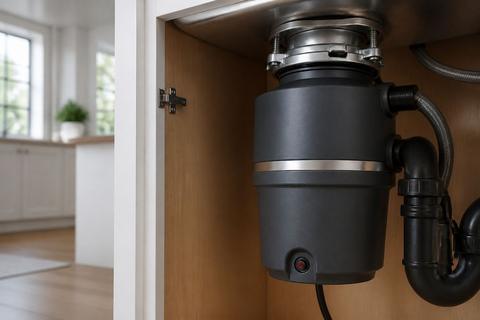
A tripped overload protector can make a disposal that’s otherwise fine seem completely dead. The red reset button is mounted on the underside of the unit; it pops out when the motor overheats from a jam, overload, or prolonged use.
- Turn the wall switch OFF.
- Locate the red overload reset button on the bottom/underside of the disposal.
- Press it in firmly until it clicks and stays in.
- If it pops back out, wait about 10 minutes to let the motor cool, then press it again.
- If you had a jam, clear the blockage first; resetting without removing the cause will trip the protector again.
Full Guide: InSinkErator Reset Button: Where It Is and How to Use It
When to Call a Plumber or Electrician
If your disposal still won’t run after checking power, clearing jams, and resetting overload protection, the next likely failures are deeper electrical issues or a failed motor/drive component. Calling a licensed professional is the safest choice when you suspect wiring problems, a damaged switch, or an internal motor fault that DIY steps won’t fix.
Call a plumber if:
- The unit is leaking and water damage is visible around the mounting or discharge connections.
- The drain line backs up when the disposal is off (suggesting a broader plumbing obstruction).
Call an electrician if:
- The breaker trips again right after attempting to start.
- You have scorch marks, melted connectors, or repeated start failures after resets.
- There’s no power at the switch/disposal feed despite confirmed breaker status.
How to Prevent Future InSinkErator Disposal Problems
Preventing disposal failures is mostly about reducing jams and overloads through better feeding habits and proper water use. You also need to avoid hard or fibrous items that are designed to clog plumbing and strain the grinding mechanism.
- Run cold water for 10–20 seconds before turning the disposal on, and keep water running while it grinds.
- Feed waste in small batches—don’t dump a large amount at once.
- Avoid hard scraps like bones, fruit pits, and shell fragments.
- Avoid fibrous wraparounds like celery, corn husks, and large potato peels—cut them smaller or dispose in compost.
- Use the dishwasher drain properly: if your model includes a plastic knockout plug for the dishwasher inlet, remove the plug before connecting the drain hose so waste drains correctly.
Frequently Asked Questions
Why is my InSinkErator garbage disposal not working at all?
An InSinkErator disposal that doesn’t work at all is most commonly dealing with no power, a tripped red reset button, a jammed flywheel, or a failed wall switch/start switch. Start by checking whether the unit is totally silent when you turn it on (dead power path) versus humming (mechanical blockage). If it’s silent, press the red overload reset button on the underside with the wall switch OFF, then try again after cooling time. If it hums but won’t grind, cut power and unjam the flywheel from underneath before resetting.
What does it mean if my InSinkErator hums but won’t spin?
If your disposal hums when you activate it but the impellers never turn, the motor is trying to start against a blockage. That points to a jammed flywheel or trapped debris in the grinding chamber, not a burned-out motor. Turn off power at the wall switch or breaker, use the included Jam-Buster hex wrench in the center socket from below to free the flywheel, lift out visible debris with tongs, then press the red reset button and restore power.
Where is the reset button on an InSinkErator disposal?
The reset button is typically mounted on the bottom/underside of the disposal unit. It’s usually a red overload protector button located where you can access it from under the sink. With the wall switch OFF, press the red button in until it clicks and stays in; if it pops back out immediately, wait about 10 minutes for the motor to cool and press it again. Use the reset button as a recovery step after an overload or jam, not as a substitute for clearing the blockage.
Should I press the reset button if the disposal is jammed?
Do not press the reset button as the first step if the disposal is jammed. If the unit is humming and locked up, resetting without clearing the obstruction forces the motor to fight the same blockage and will trip the overload protection again. First, cut power and unjam the flywheel using the Jam-Buster wrench, then remove any visible debris with tongs. After the jam is cleared, press the red reset button once, then restore power.
When should I replace my InSinkErator garbage disposal?
Replace the unit when troubleshooting cannot restore normal operation or when failures repeat. Consider replacement if the motor fails repeatedly even after correct reset and unjamming, if the unit leaks in a way that indicates internal seal failure, or if the disposal is older and becomes costly to repair again and again. If you consistently find wiring or internal component damage and the unit still won’t run safely, replacement is often the most practical solution.