Window Air Conditioner Not Working: Diagnose Every Common Cause
If your window AC turns on but the room never gets comfortable, you’re not alone—this is one of the most common summertime breakdowns. The quickest way to get cold air back is to match the symptom you see (or the sound it makes) to the most likely cause. Window Air Conditioner Not Working: Diagnose Every Common Cause helps you narrow it down fast—before you waste time on the wrong fix.
Window AC Running but Not Cooling
If your unit powers on yet the air stays warm, focus on what moves heat: airflow and the coil heat exchange. The most common causes are a dirty filter, incorrect thermostat/mode settings, restricted intake/exhaust, or a problem on the evaporator/condenser side. Start with the simplest airflow checks first because they mimic more serious failures.
Window AC Running but Not Cooling: Diagnose Every Common Cause
- Check the thermostat mode: set to Cool and raise the set temperature below the room temperature (for example, set to 72°F if the room is 78°F).
- Confirm the fan speed: switch to High (or Max) to increase airflow and reduce cycling.
- Clean the filter: slide out the washable mesh filter from the front grille, rinse with water, let it dry fully, and reinstall.
- Remove airflow restrictions: ensure furniture/curtains are not blocking the intake and that the outdoor side isn’t covered by debris.
- Inspect the vents: adjust louvers so air blows into the room, not straight into a wall.
- Watch the compressor delay: if the fan starts but cold air doesn’t arrive for a few minutes, wait—many window units enforce about a 3-minute protection delay after cycling power.
- If cooling still never arrives, the issue is likely coil performance, a seized fan, or an electrical/thermostat fault—move to deeper diagnostics in the matching child article.
Full Guide: Window AC Running but Not Cooling: Causes and Fixes
Why Your Window AC Freezes Up and How to Defrost It
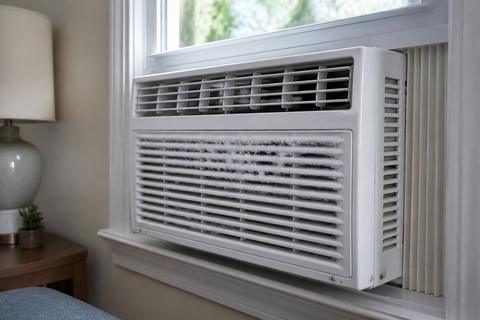
Ice on the evaporator coils usually means the unit isn’t moving enough heat out of the room. Common triggers include blocked airflow from a dirty filter, restricted vents, running too cold for the room conditions, or a refrigerant problem. The key is to defrost safely, then fix the underlying restriction so it doesn’t refreeze.
- Turn the unit off and switch to Fan Only if your controls allow it (fan-only helps melt ice faster without adding cooling).
- Leave the unit running on fan-only until the ice fully melts and water drips stop inside the cabinet.
- Power off and unplug if your model does not have fan-only mode, then allow melting at room temperature.
- Once thawed, clean the filter and remove any intake obstructions—this prevents immediate refreezing.
- After clearing ice, avoid running the unit in very cold nights where the room temperature is below about 62°F; that condition often worsens freezing on window units.
- If it refreezes right after a clean filter and proper airflow, you likely have a coil/low-charge issue that needs professional service.
Full Guide: Why Your Window AC Freezes Up and How to Defrost It
Window Air Conditioner Error Codes Explained
Error codes exist to pinpoint sensor faults, communication problems, or safety shutdowns. When you see a code, the smartest move is to interpret it as guidance—not as a generic “something is wrong” message. Codes often tell you whether you should reset, clean a sensor-related component, or schedule a repair.
- Locate the code in the display window and note the exact characters (including letters like E1/EC on some brands).
- Power cycle safely: turn the unit off, wait about 5 minutes, then turn it back on to see if the same code returns.
- If the code relates to a blocked airflow item, clean the filter and ensure vents aren’t obstructed before troubleshooting further.
- Match brand-specific codes precisely (example: Midea-built units may show E1 for an open/shorted room-temperature sensor and EC for refrigerant-leak detection—do not guess at meaning).
- If the same code comes back immediately after a reset or involves refrigerant/safety, stop DIY troubleshooting and move to service—the system is protecting itself.
Full Guide: Window Air Conditioner Error Codes Explained
Window AC Keeps Tripping the Breaker: What to Check
A breaker that trips repeatedly is a warning sign: the unit is drawing more current than the circuit can provide, or there’s an electrical problem that needs attention. The most common safe homeowner checks are about circuit load, visible damage, and the basics of power delivery. If it trips again right away, treat it as an electrical fault rather than a nuisance.
Window AC Keeps Tripping the Breaker: What to Check
- Identify what’s on the same circuit: move high-draw items (space heaters, hair dryers, microwaves) off that breaker and try the AC alone.
- Check the breaker rating: window ACs require dedicated or properly rated circuits—confirm you’re not using a weak extension cord or undersized outlet.
- Ensure the unit is plugged into the correct outlet type: most window ACs use an LCDI safety plug with built-in protection; do not bypass it.
- If your power cord has TEST/RESET buttons (UL-required LCDI), press RESET firmly until it clicks; press TEST only if the instructions allow. If it trips again immediately, the leakage detector or unit’s wiring is faulty and the cord should not be bypassed.
- Inspect for damage: look for scorching, melted plastic, or loose connections at the outlet and at the unit’s plug connection.
- If the breaker trips specifically at startup, suspect compressor-starting issues (capacitor, motor windings) and stop DIY if you see repeated fast tripping.
Full Guide: Window AC Keeps Tripping the Breaker: What to Check
Can You Recharge a Window Air Conditioner? What to Know
Low cooling performance triggers the “recharge it” idea, but window ACs are usually sealed systems designed not for routine refrigerant topping off. If charge is truly low, that means a leak exists, and adding refrigerant without fixing the leak is unsafe and won’t be a lasting fix. A technician should find and repair the leak, then evacuate and recharge correctly.
- Know what “recharge” really means: it’s not a simple top-off—it requires recovery, evacuation (removing air/moisture), and correct weigh-in of refrigerant.
- Look for signs of a refrigerant problem: reduced cooling despite correct settings, ice formation that refreezes after basic airflow fixes, or repeated cycling with low temperature output.
- Assume sealed systems: unless your model is explicitly designed for homeowner refrigerant service (rare for window units), treat it as a professional repair.
- Don’t DIY with “stop leak” or DIY can recharge kits—these can damage the system and complicate repairs.
- If cooling is weak, focus first on airflow causes (filter/vents/coils restrictions). If those are resolved and performance doesn’t return, schedule service.
Full Guide: Can You Recharge a Window Air Conditioner? What to Know
Window AC Humming or Buzzing at Startup: What to Check
A hum or buzz right when the unit starts is often an electrical or mechanical clue. Weak capacitors, debris in the fan path, and a stuck fan are common causes—each points to different next steps. Treat the sound as a signal: you’re looking for what prevents normal starting and airflow.
Window AC Humming or Buzzing at Startup: What to Check
- Power off immediately if the buzz is loud, repeated, or accompanied by burning smell.
- Inspect airflow for obstructions: check for loose items, collected lint, or debris near the intake and behind the grille that can contact the fan.
- Clean the filter and front grille so the fan isn’t struggling against restricted airflow.
- Check the fan operation: after turning the unit on (and waiting the normal compressor delay), confirm the fan runs smoothly; a fan hitting debris can cause buzzing.
- Inspect installation alignment: ensure the unit isn’t tilted backward (about 1/4 to 1/2 inch toward the outside) so condensate and cabinet water don’t create extra mechanical problems.
- If the sound persists and cooling never starts, suspect a starting capacitor or failing motor component—this is an electrical repair best handled by a technician.
Full Guide: Window AC Humming or Buzzing at Startup: What to Check
How to Make a Window Air Conditioner Quieter
Not all window AC noise signals a failure. Everyday sounds can come from normal fan rotation and cabinet vibration, but rattling or sharp buzzing usually indicates something loose, misaligned, or contacting the fan. Quieting the unit often starts with airflow and installation fixes that reduce vibration paths.
How to Make a Window Air Conditioner Quieter
- Reseat and tighten: turn off the unit and check the front grille and side panels for loose screws or gaps that can rattle.
- Confirm correct tilt: the unit should tilt slightly toward the outside so water flows correctly; wrong tilt can increase cabinet noise from water and pan contact.
- Verify fit in the window opening: if there’s extra play, use proper window support to reduce movement while the compressor runs.
- Clean the fan area: a dirty fan or restricted intake can cause louder operation—remove and wash the filter and clear lint from the front grille.
- Check for contact points: listen for intermittent rattles that correlate with fan speed; these usually mean an item is contacting the fan or the cabinet.
- If you hear loud grinding or the unit vibrates strongly, stop and get service—mechanical wear is not a DIY “tighten and ignore” situation.
Full Guide: How to Make a Window Air Conditioner Quieter
GE Window Air Conditioner Troubleshooting: Common Fixes
GE window ACs share many of the same failure points as other brands: airflow restrictions, sensor/control issues, compressor protection delays, and filter maintenance reminders. The main difference is how GE reports problems (including indicator behavior and certain reset/filter routines). Use this section to choose the right symptom path, then follow the matching child article for the exact fix.
GE Window Air Conditioner Troubleshooting: Common Fixes
- Start with the symptom: cooling failure, freezing, error code, breaker trips, or abnormal startup sounds—pick the matching section.
- Address airflow first: clean the filter, ensure intake vents are unobstructed, and confirm you’re in Cool mode with the set temperature below the room.
- Watch compressor delay behavior: if the fan starts but cold air doesn’t arrive for a few minutes after powering on, that delay is normal protection.
- Check the basics of power: use a proper wall outlet and avoid extension cords; confirm the plug fully seated and the outlet has power.
- Clear ice before deep troubleshooting: if you see frosting, defrost and clean the filter first—repeat freezing after that points to a deeper issue.
- If an error code appears or the unit won’t run consistently, switch to the error-code and reset articles instead of guessing at parts.
How to Reset a GE Window Air Conditioner
A reset clears minor control glitches and can help after a power outage or brief interruption. It won’t fix blocked airflow, frozen coils, or mechanical/electrical failures, but it’s a safe first step when the unit misbehaves or shows a transient fault.
How to Reset a GE Window Air Conditioner
- Turn the GE window AC off using the control panel.
- Unplug the unit from the outlet (or switch off the breaker) and wait 5 minutes.
- Plug it back in and turn it on; set Cool and adjust the temperature below the room.
- If the unit has a “Reset” or “Filter Reset” function, use it only for its intended purpose—don’t press other buttons repeatedly.
- If the same fault returns immediately after reset, proceed to the specific symptom or code troubleshooting rather than resetting again and again.
GE Window AC Filter Reset: Clear the Light After Cleaning
GE models commonly include a filter reminder light after about 250 run-hours. After you clean the filter, the reminder may stay on until you clear it using the correct reset method. This prevents you from mistaking a maintenance reminder for a larger fault.
GE Window AC Filter Reset: Clear the Light After Cleaning
- Slide the washable mesh filter out of the front grille.
- Rinse it under water, remove excess water, and let it dry completely.
- Reinstall the filter in the correct orientation.
- Locate the Filter / Reset Filter button on the control panel.
- Press and hold the Filter Reset button for the amount of time specified by your model (often a few seconds) until the light clears.
- If the light does not clear after resetting, confirm the filter is fully seated and the unit is powered on before trying again.
Full Guide: GE Window AC Filter Reset: Clear the Light After Cleaning
Frequently Asked Questions
Why is my window air conditioner running but not cooling the room?
If your window AC runs but the room never cools, the cause is usually airflow or heat-exchange. Start with the most common issues: a dirty or missing filter, blocked intake/exhaust vents, incorrect mode (not on Cool), or an obstructed airflow path that prevents warm air from reaching the evaporator coils. If you also rule out thermostat/settings problems and normal compressor delay behavior, the next likely causes are a failing fan, restricted coils, or an electrical/control fault on the cooling system.
What does it mean if my window AC freezes up?
Freezing on a window AC typically means the evaporator coils aren’t shedding heat efficiently. The most common reasons are restricted airflow (dirty filter, blocked intake, closed louvers toward a wall), running under conditions that encourage freezing (including cool room nights below about 62°F), or a low refrigerant charge/leak. When it refreezes after you clean the filter and restore airflow, it points away from simple maintenance and toward a coil/refrigerant problem that needs service.
Why does my window AC trip the breaker when it starts?
Breaker trips happen because startup draws extra current and the circuit or electrical components can’t handle the load. Common triggers include an overloaded outlet/breaker, using the wrong power connection, or a failing compressor-starting component that causes a surge. If your unit uses an LCDI safety plug with TEST/RESET, pressing RESET until it clicks is normal—if it trips again right away, treat it as a safety/electrical fault rather than continuing to run the unit.
Can a window air conditioner be recharged with refrigerant?
Window AC recharge is not a normal homeowner maintenance task. Many window units are sealed systems and aren’t designed for routine topping off; low refrigerant usually indicates a leak or a repair need. Proper refrigerant service requires recovery, evacuation, and the correct weigh-in of refrigerant—plus leak repair. For safe, lasting results, a technician should evaluate performance drop, find leaks if present, and recharge correctly.
Should I reset my GE window AC after a fault or power outage?
Yes—resetting is worth trying when the unit misbehaves after a power outage, brief interruption, or a temporary control glitch. Unplug (or switch off the breaker) for about 5 minutes, then power it back on and set Cool with a temperature below the room. If the same symptom or error returns immediately after reset, the problem is underlying (airflow restriction, sensor fault, or an electrical/mechanical issue), and repeated resets won’t solve it.